
Wild Tokyo · Canada
Wild Tokyo Casino App & Mobile Access
Add Wild Tokyo to your home screen
Wild Tokyo’s installation page provides browser-based home-screen instructions for iOS Safari and Android Chrome. Follow the steps for your browser; these instructions are not an Apple App Store or Google Play download.
Open Install App in the casino navigation to find the device instructions.
iPhone and iPad: Safari
- Open Wild Tokyo in Safari.
- Tap Share in the bottom panel.
- Choose Add to Home Screen.
- Tap Add to confirm.
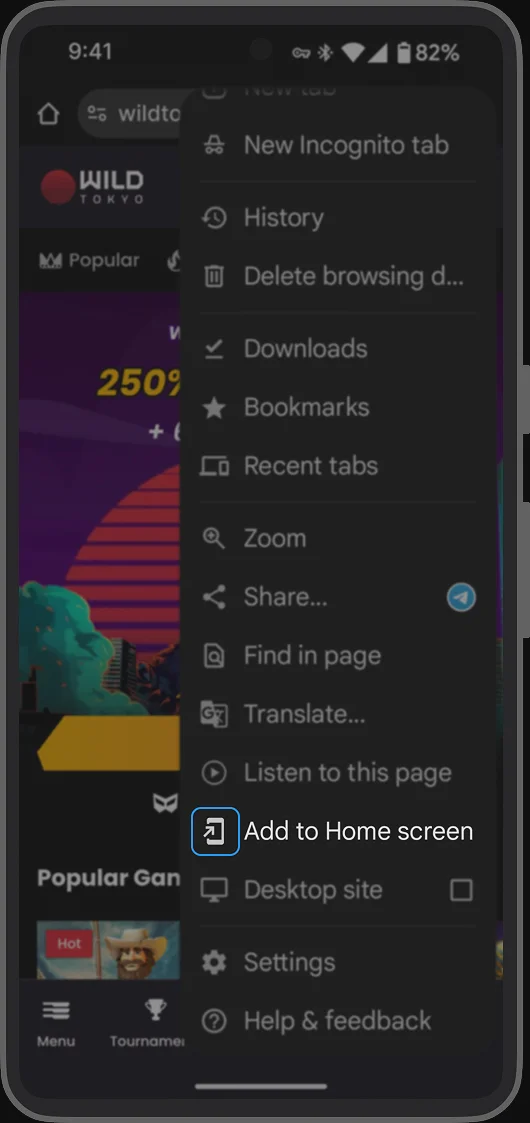
Android: Chrome
- Open Wild Tokyo in Chrome.
- Tap More at the top right.
- Choose Add to Home screen.
- Tap Install.
Menu wording and placement can vary with browser versions. The casino’s installation guide is the reference for this workflow; no APK download is needed for the steps shown here.
Use your existing account
Open the home-screen entry, then choose Log in to access your account. Installing a shortcut does not create a new casino account or change bonus eligibility. See login and recovery guidance if you need help signing in.
You can also reach the casino through the browser. Choose the format that suits your device, and keep your browser updated. Avoid entering account details into third-party app downloads.